
Encryption for Privacy and Security in floref
floref is designed with privacy and security in mind. By introducing encryption to our platform, we've implemented powerful features that protect your data from breaches or malicious actors, and give you complete control over the privacy of your growing image library.
All your images and canvases stored on floref cloud are securely encrypted. By default, floref handles your encryption keys for you, providing a seamless experience and a strong level of security. For artists seeking the highest level of protection, you can add a pin or passphrase to your account to enable full end-to-end encryption. This gives you total control over your images, ensuring that only you can access them.
How can I use it?
By default, all images and canvases are now encrypted on upload to floref, so you don't need to do anything - your data is already protected by encryption.
While floref's default encryption provides a strong level of security, you can enable full end-to-end encryption for even greater control over your data. To do this, simply add a pin or passphrase to your account in your security settings.
By providing a pin or passphrase, floref no longer manages the secret that unlocks your data. This means that it will become practically impossible for anyone other than you to access your images!
Providing a pin or passphrase means that each new device that connects to floref will also need to have the pin or passphrase provided in order to access floref cloud images. Floref does not keep this pin or passphrase anywhere, however once a device is unlocked, the device will be kept unlocked without the need to re-input the pin.
Why enable end-to-end encryption with a pin or passphrase?
This can be useful for artists who are especially sensitive about their data privacy, for example, artists who have NDAs on the subject matter of their references, or artists who live in places where internet security is a major concern.
While this means that by design, nobody can see your data except with the possession of the pin or passphrase, it also means that if you forget your pin or passphrase, there is now no way to recover your data (not even floref admins can help!). So make sure to choose a pin or passphrase that you can remember, and consider storing it in a secure password manager for safekeeping.
We feel that most artists will be satisfied with the security and privacy offered by the default floref settings, however to accomodate the needs of industry professionals, we've also included the option for artists to choose the level of security and privacy controls that they need.
How it works
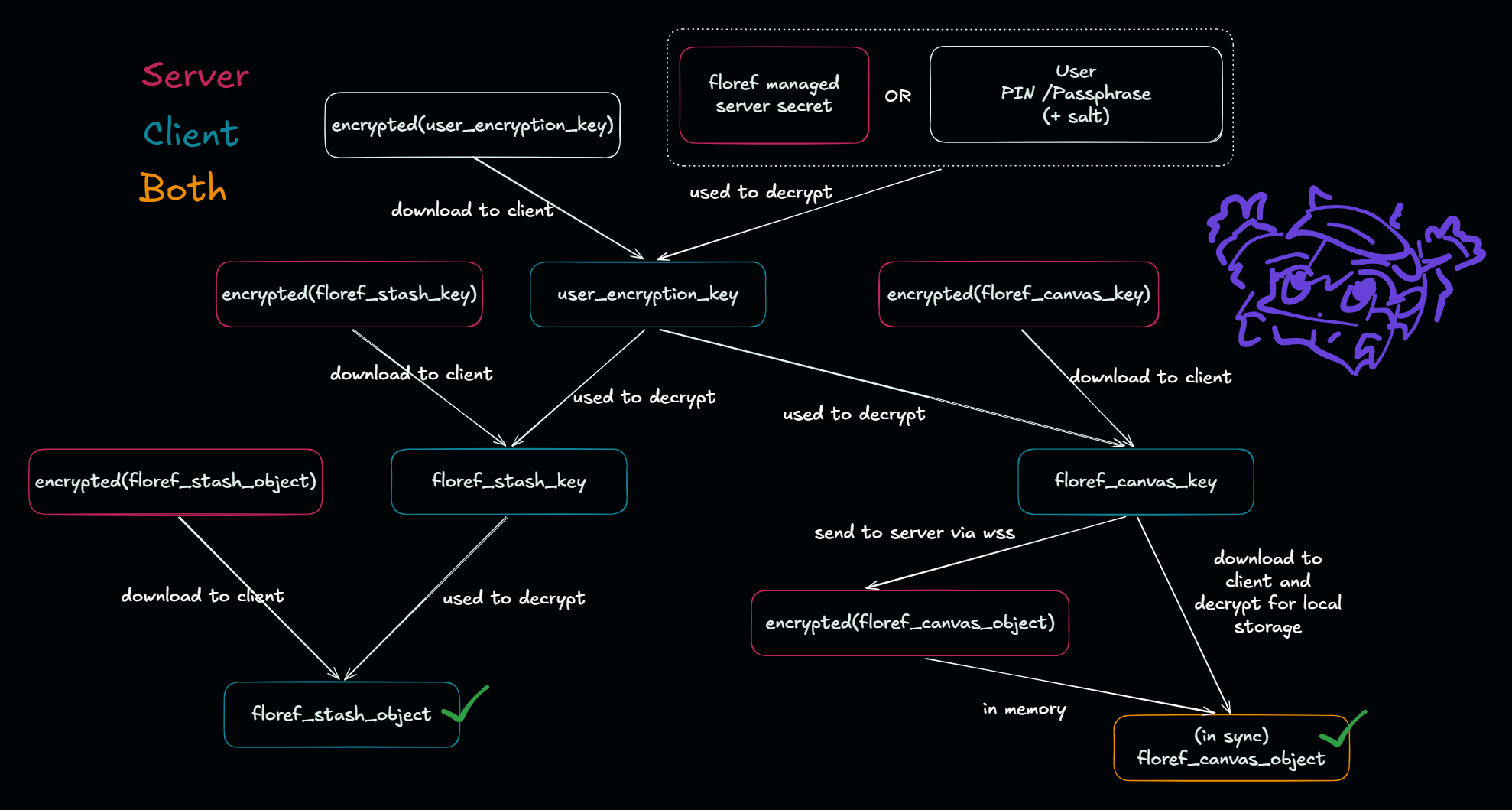
Locally, images in the stash are stored in the origin-private-filesystem. However on syncing to floref, in addition to the existing https encryption which secures most of internet traffic today, we also introduce a secondary layer of encryption for storage as well as privacy by encrypting and decrypting the images when uploading and downloading from floref cloud.
In order to achieve a high level of security and privacy we use "Envelope Encryption" to securely store each image. That is - each image is encrypted with a unique data encryption key (DEK), and the DEK is then encrypted with a key encryption key (KEK) that is derived from the user's pin or passphrase (if provided) or generated and managed by floref (if no pin or passphrase is provided). This means that even if someone were to gain access to the encrypted images on floref cloud, they would not be able to decrypt them without also having access to the KEK, which is protected by your pin or passphrase, or securely stored by floref in a separate location from the image cloud.
Canvases on the other hand are encrypted at rest on cloud. We use a similar mechanism to images to store the keys, but on connection to your device, key exchange is facilitated to the server so that syncing can be handled. As we use LoroDoc to ensure canvases are consistent and synced concurrently across devices, the server needs to be able to read the canvases in order to perform the necessary conflict resolution and merging, so end-to-end encryption is not currently available for canvases. We will be exploring options to allow this in the future.
While floref-managed keys do provide security for images stored in floref cloud, it is theoretically possible for floref ourselves to access the images with some difficulty. While this may be the case, we believe this is acceptable for most users as this is the same model that most existing cloud providers use (such as google drive, dropbox, etc), and that for most users, the risk of losing access to all their data due to forgetting their pin or passphrase is far greater.